NVDA142.38 +2.14%
SMCI58.92 +4.87%
META518.63 +1.22%
TSLA248.11 -1.04%
SMH287.44 +1.88%
XLK234.09 +0.92%
ARKK51.30 -0.43%
URA32.78 +3.11%
BOTZ36.42 +0.67%
COIN212.55 -2.31%
MSTR387.04 +5.62%
AVGO182.73 +1.44%
AMD166.27 -0.82%
CRWD341.90 +2.07%
PLTR41.18 +3.58%
SPY567.21 +0.34%
QQQ489.02 +0.51%
IWM216.78 -0.28%
NVDA142.38 +2.14%
SMCI58.92 +4.87%
META518.63 +1.22%
TSLA248.11 -1.04%
SMH287.44 +1.88%
XLK234.09 +0.92%
ARKK51.30 -0.43%
URA32.78 +3.11%
BOTZ36.42 +0.67%
COIN212.55 -2.31%
MSTR387.04 +5.62%
AVGO182.73 +1.44%
AMD166.27 -0.82%
CRWD341.90 +2.07%
PLTR41.18 +3.58%
SPY567.21 +0.34%
QQQ489.02 +0.51%
IWM216.78 -0.28%
built for trader success

AI-assisted screening, charting, journaling, and planning.

TradeJitsu puts a chart-aware AI agent beside the full trading workflow: flexible scanners, pro-grade charting, LLM-powered trade plans, and AI-reviewed P&L journals.

TRADEJITSU / CHART AI
LIVE · DAILY · EST
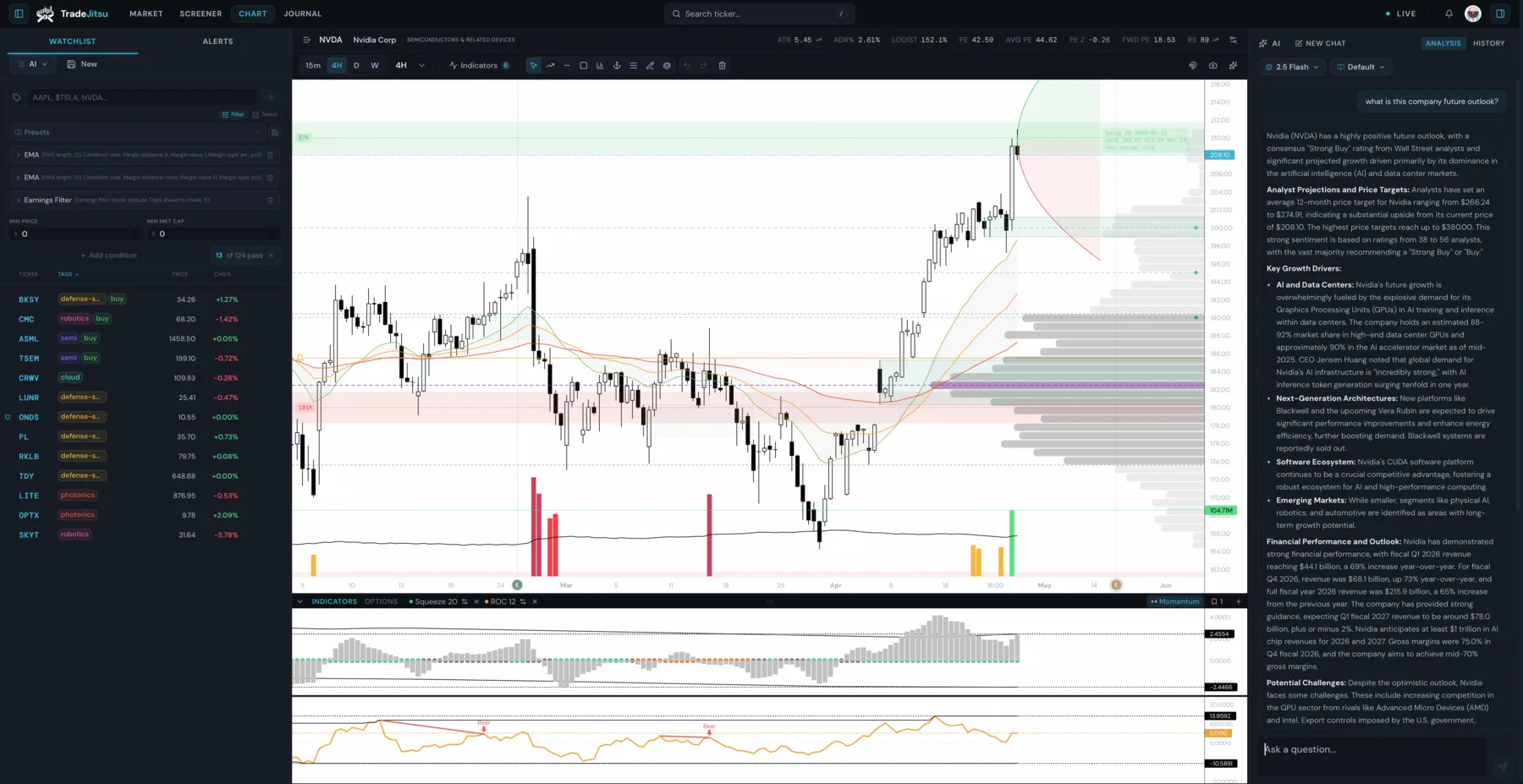
TradeJitsu chart workspace with a populated watchlist, NVDA daily chart, and AI agent analysis panel.
Price
144.82
RS
94
ADR%
3.2%
Vol Dryup
0.62
↓ scroll
AI-assisted trading workflow
Market breadthScannerAI agent panelChartJournal1 app

Four tools open. One trade to make.

Most active traders run the same fragmented stack: one tool to scan, another to chart, a spreadsheet to journal, and a separate place to validate ideas. Every step in that chain costs time and introduces second-guessing.

By the time you've found a stock, pulled up the chart, reconfigured your indicators, and consulted the rules, the setup has moved or the trade context has gone stale.

PAIN · 01

The scanner stops at raw lists.

A broad scan is only useful if you can turn it into a tradeable shortlist. Without market context, chart structure, and an AI second pass, you still spend the session translating rows into decisions.

PAIN · 02

The chart is separated from the plan.

Indicators, notes, watchlists, and AI review often live in different places. That break in context makes it harder to move from setup, to risk, to execution without rebuilding the story each time.

PAIN · 03

The journal arrives too late.

A static log can record the result, but it does not connect the original chart, the trade plan, and the post-trade review. The feedback loop stays manual.

TradeJitsu collapses this into one AI-assisted workflow.

Market context, scanner results, chart review, AI planning, alerts, and journal feedback stay connected from the first filter to the final review.

Features
TRADEJITSU / AI SCREENER
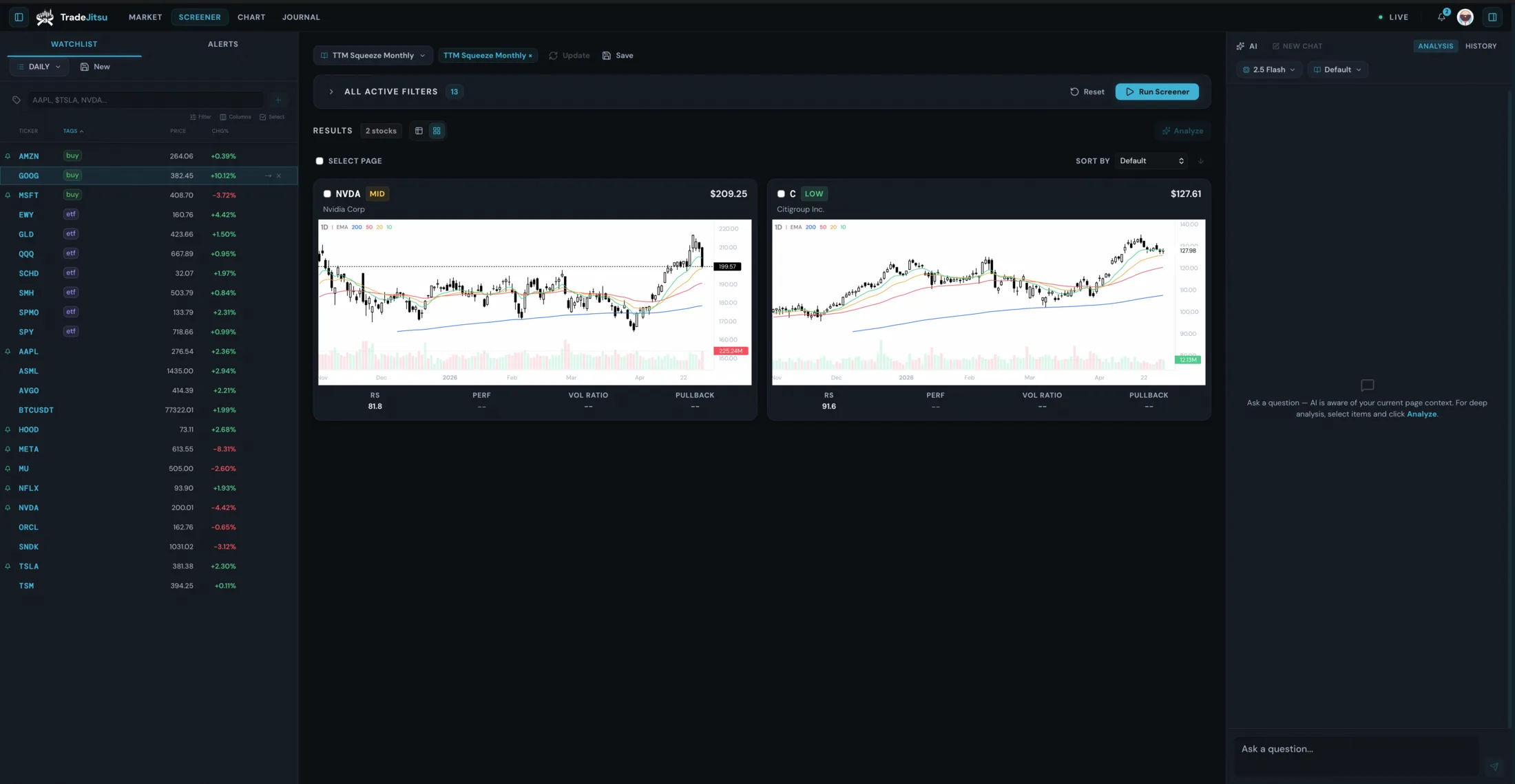
TradeJitsu AI-assisted screener with a populated watchlist, chart-card scan results, and AI agent panel.
AI-assisted screener

Scan the market with AI beside the results.

Flexible scanners help you move from broad market breadth to focused watchlists without leaving the workflow. Filter for technical structure, liquidity, trend, volatility, and relative strength, then open the AI panel against any scan to rank setups, pressure-test risk, and explain what deserves chart time.

  • Build scanner presets around the setup language you actually trade
  • Pair market breadth with scanner output for stronger context
  • Send selected scan context to the AI agent for setup and risk review
TRADEJITSU / CHART AI
TradeJitsu chart workspace with a populated watchlist, NVDA daily chart, and AI agent analysis panel.
AI chart analysis

Turn the chart into an inspectable AI-assisted plan.

Open a result on the chart with your indicators already loaded. AI Vision Model reviews the chart image against your trading instruction and returns entry, stop, risk, targets, and warnings for you to interrogate.

  • Preconfigured Multi-EMA, TTM Squeeze, CVD, Order Blocks, Volume Profile, and VWAP
  • Structured AI output: entry, stop, risk%, targets, and warnings
  • Persistent chat history (up to 20 messages) for follow-up questions per session
TRADEJITSU / AI JOURNAL
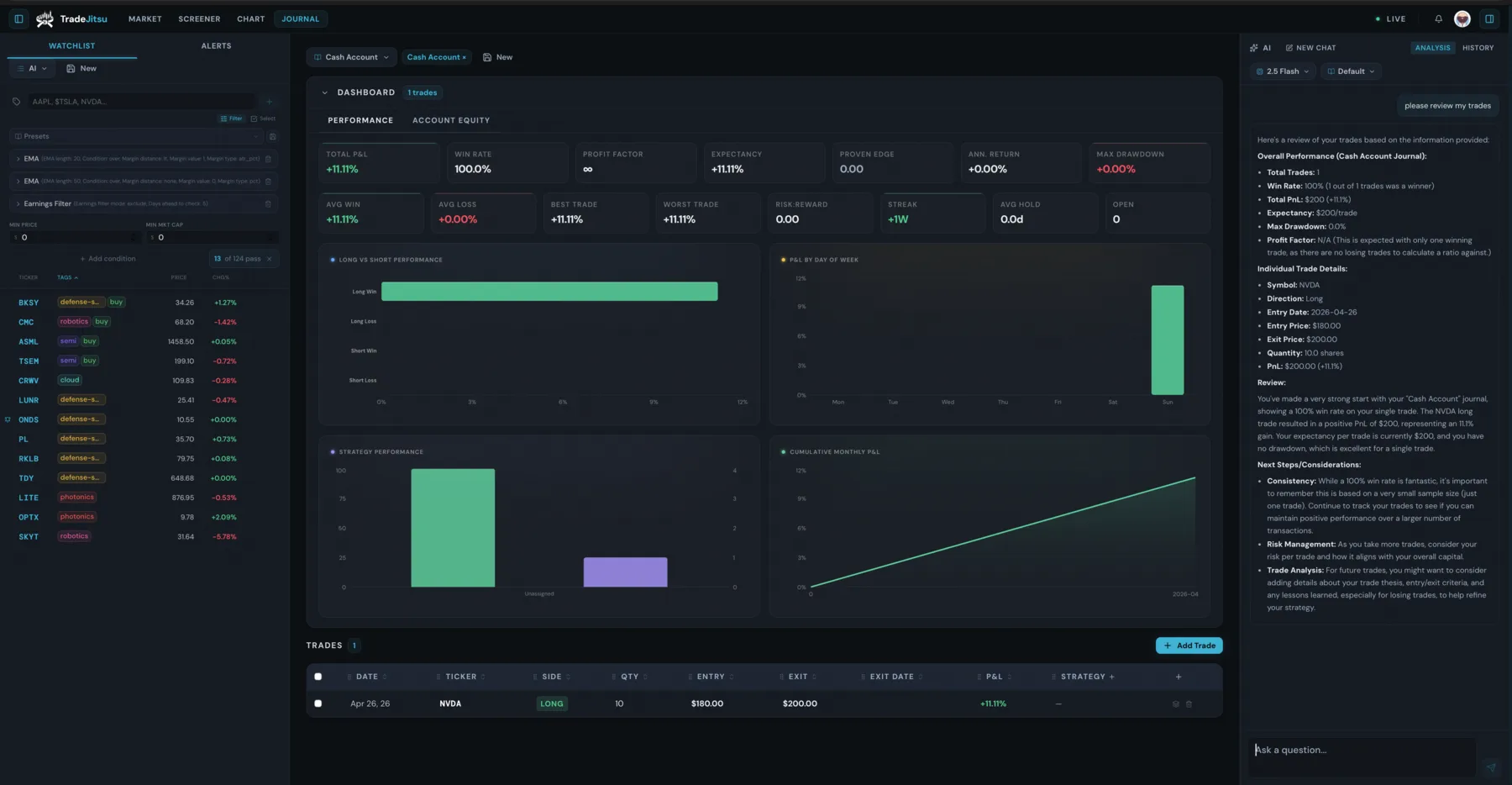
TradeJitsu journal dashboard with populated performance metrics, trade review data, and AI journal review panel.
AI-assisted journal

Close the loop with AI-assisted execution review.

Log fills, attach the chart, review P&L, and send closed trades back to AI for post-trade analysis. Alerts, watchlists, presets, and market context keep the workflow moving without adding another tab.

  • Multiple journals with partial fills, options rolls, and chart attachments
  • AI post-trade review against the same instruction used for the original plan
  • Telegram alerts, watchlists, presets, and market views for follow-through

From AI-assisted scan to reviewed trade in three steps.

  1. 01
    TradeJitsu AI-assisted screener with a populated watchlist, chart-card scan results, and AI agent panel.
    AI screen

    Run a flexible scanner, check the market backdrop, then ask the AI agent to rank the scan by setup quality, liquidity, and risk.

  2. 02
    TradeJitsu chart workspace with a populated watchlist, NVDA daily chart, and AI agent analysis panel.
    AI analyze

    Open any result on the chart. Your indicators are already loaded: Multi-EMA, TTM Squeeze, CVD, Order Blocks, and VWAP. Send the chart to the AI vision model for a structured entry, stop, target, and warning plan.

  3. 03
    TradeJitsu journal dashboard with populated performance metrics, trade review data, and AI journal review panel.
    AI review

    Add the trade to your journal with the chart image attached. After the trade closes, send the record back to AI to review execution, rule adherence, and recurring mistakes.

TradeJitsu is built for any kind of trader.

PERSONA · A

The Active Swing Trader

Pain

You need a fast path from market scan to chart review without rebuilding watchlists, indicators, risk notes, and journal records in separate tools.

Resolution

The AI-assisted scanner sends qualified results directly into charts with your indicators already configured. AI helps form the entry, stop, and target plan. The journal logs the fill.

PERSONA · B

The Developing Trader

Pain

You know your setup rules, but you want a second pass on whether the chart, risk, liquidity, and market backdrop actually support the trade.

Resolution

The AI analyzer runs against your trading instruction. It explains what qualifies, what is weak, where risk sits, and what to watch before entry.

PERSONA · C

The Screener-First Trader

Pain

You start with filters and breadth, then need to quickly decide which symbols deserve chart time and which are just noise.

Resolution

TradeJitsu keeps scanning, chart review, AI ranking, watchlists, and journal review in one surface so every candidate can move through the same workflow.

TradeJitsu keeps the trading workflow connected.

The platform is built around the way traders actually work: read the market, narrow the list, inspect the chart, pressure-test the plan, track the trade, and review the outcome without rebuilding context between steps.

Market breadth

01

Read the market backdrop before committing chart time to any symbol.

Flexible scanners

02

Build presets around trend, liquidity, volatility, relative strength, themes, and technical structure.

AI agent panel

03

Ask for setup ranking, risk pressure tests, trade-plan review, and follow-up analysis in context.

Chart

04

Move from scanner result to chart workspace with core indicators and watchlist context intact.

Journal

05

Attach charts, record fills, review P&L, and send closed trades back through AI review.

1 app

06

Keep the full decision loop in one surface: scan, chart, plan, alert, execute, and review.

Private beta access for individual traders.

Free
$0forever

Explore the workflow during private beta.

  • AI-assisted screener with select filters
  • Charts with core indicators and AI chat
  • Journal with basic trade logging and AI review
Request beta access

No credit card required

Recommended
Pro
BetaPrivate access

Full access when Pro opens after beta.

  • AI-assisted flexible scanners with market breadth and watchlist context
  • AI-ready charting with Multi-EMA, CVD, Order Blocks, TTM Squeeze, Volume Profile, and VWAP
  • LLM-powered trade plans, follow-up chat, and custom instruction personas
  • Journal with fills, rolls, chart attachments, KPI dashboard, and AI post-trade review
  • Telegram alerts, theme rotation scanner, presets, watchlists, and multiple journals
Request beta access

No broker connection required. Paid Pro pricing appears before subscription access opens.

Questions traders ask before switching.

Where does the market data come from?
TradeJitsu uses professional OHLCV market data across US equities. Beta access starts with delayed data for screening and chart review; real-time availability will be listed before paid Pro access opens.
Which AI model does TradeJitsu use, and what happens to my chart data?
TradeJitsu uses an AI vision model for AI-assisted chart analysis. Your chart is sent as an image to the model provider and analyzed against the trading instruction configured for the workflow.
Is there a free tier?
Private beta access is free while launch limits are finalized. Paid Pro pricing will be shown before any subscription is required.
Which browsers does TradeJitsu support?
TradeJitsu runs in any modern browser. Chrome, Firefox, Edge, and Safari are all supported. The charting layer uses lightweight-charts and renders via HTML5 Canvas. No browser extensions or plugins required.
Is there a mobile app?
TradeJitsu is a responsive web application. The full workstation is designed for desktop chart review; mobile is best for checking alerts, reviewing watchlists, and reading journal notes.
How does account login work?
TradeJitsu uses Google sign-in through Supabase Auth. Your journal, watchlists, screener presets, and alert configurations are stored in your account and persist across sessions.
Is TradeJitsu for day traders or swing traders?
TradeJitsu is built for self-directed traders who want one workflow for scanning, charting, AI-assisted planning, alerts, and journaling. It is strongest for discretionary traders who review setups before acting, whether the setup is swing, position, theme-driven, or scanner-first.
Can I export my journal data?
Journal export is planned for Pro so traders can keep their own records outside TradeJitsu.
Does TradeJitsu connect to my broker?
No. TradeJitsu is an analysis and journaling platform — it does not connect to brokers, route orders, or execute trades. You log your own fills manually.
Can I cancel my subscription at any time?
Yes. When paid Pro access opens, subscriptions will be cancellable from account settings.

Your AI-assisted trading workflow, in one tab.

Stop context-switching between tools. Market breadth, flexible scanners, chart plans, alerts, and journal reviews are all here.

Request beta accessNo credit card · Paid Pro pricing before subscription